
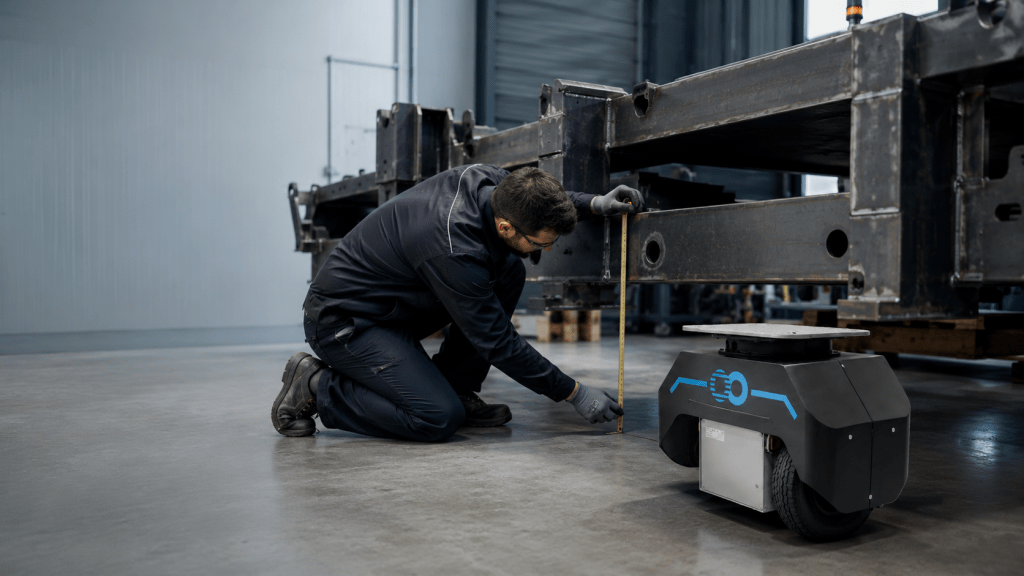
Automating an industrial operation does not necessarily mean rebuilding everything around it.
In many workshops, the structure in use remains perfectly useful. It holds a part, carries tooling or a load, or interfaces properly with workstations. Yet moving it still depends on manual effort, the availability of a vehicle or an arrangement that is difficult to synchronize.
The problem may not lie in the structure itself. It may lack a capability: moving more easily, following a defined route, reaching a workstation at the right time or gradually integrating into an automated flow.
The right approach is therefore not to choose a robot, conveyor or new installation immediately. It starts with a simpler question:
“Which part of the operation really needs to change?”
By distinguishing what should be retained, what needs adapting and what can be automated, you can explore a gradual transformation aligned with the existing industrial environment.
Why replacing everything is not always necessary
An industrial structure often combines several functions.
It may provide:
- support for a part;
- protection for a component;
- support for tooling;
- positioning of an assembly;
- transfer between operations;
- an interface with a machine or workstation.
Some of these functions may remain perfectly suitable even when the structure’s mobility no longer matches production pace.
Replacing everything then means rebuilding not only the means of movement but also interfaces, fixing points, gauges, operating practices and sometimes part of the work environment.
That may be appropriate when equipment is damaged, unsuitable or nearing the end of its service life. It should not, however, be the automatic answer to a problem primarily about movement.
The goal is not to preserve existing equipment at all costs. It is to distinguish what still has operational value from what truly needs to change.
That distinction begins with time spent observing on site: recognizing that a structure is already limiting production helps identify the real need before planning a transformation.
Identify the movement to automate
Before comparing technologies, define precisely what the system must do.
Is the goal simply to make a heavy structure easier to move? Control it remotely? Have it follow a repeated route? Position it at a workstation? Or coordinate its movement with several process stages?
These needs do not lead to the same project.
Movement, guidance and positioning
Movement takes the structure from one point to another.
Guidance concerns the route, turns and how passages are negotiated.
Positioning matters when the structure must arrive accurately at a machine, tool, loading area or interface.
An operation may need all three functions, but to very different degrees.
Synchronization with production
In some cases, the main issue is not the route but the timing of the movement.
The structure must then:
- leave a workstation when an operation ends;
- reach an available area;
- wait for authorization;
- arrive when the next workstation is ready;
- clear a space at the right moment.
Automation then concerns coordination as much as movement itself.
Motorization does not mean full autonomy
Adding movement capability does not automatically make a structure fully autonomous.
Motorization can remain:
- operated by a person;
- controlled remotely;
- limited to a few predefined missions;
- supervised by staff;
- gradually integrated into a broader sequence.
This distinction avoids overengineering the project and helps select a level of complexity suited to the real need.
Retain, adapt and automate
A coherent integration can be considered in three layers.
What can be retained
The structure itself may remain suitable if it is:
- mechanically sound;
- suited to the load;
- compatible with workstations;
- equipped with still-useful tooling;
- familiar to the teams.
Its dimensions, holding points and certain interfaces can represent significant industrial value.
What needs adapting
Adding mobility may require targeted adaptations:
- creating or reinforcing load-bearing points;
- adding a mechanical interface;
- modifying a support area;
- integrating a locking device;
- adapting the controls;
- making limited changes to the route.
These changes must be sized for actual forces, not based on a supposedly universal interface principle.
What can be automated
Depending on use, it becomes possible to consider:
- movement;
- guidance;
- positioning;
- calling the structure;
- executing missions;
- synchronization with workstations;
- the coordination of several modules.
The right architecture automates the useful function without adding unnecessary complexity.
Technical parameters to analyze
A structure cannot be automated based solely on a photograph or its nominal mass. The study must account for how it actually behaves in operation.
The structure and its load
Document:
- dimensions;
- unladen mass;
- total loaded mass;
- load variations;
- materials;
- rigidity;
- load-bearing points;
- available interface areas;
- existing wheels or supports;
- accessories that change its overall dimensions.
Load distribution matters as much as total mass.
A high, off-center or variable center of gravity can affect stability during acceleration, stopping and turns.
The real environment
The route must be studied under normal conditions:
- smooth or uneven flooring;
- indoors or outdoors;
- gradients;
- thresholds;
- obstacles;
- passage widths;
- doors;
- turning radii;
- passing zones;
- shared operation with people or vehicles;
- dust, humidity or temperature where relevant.
An unloaded trial in a clear area does not always represent real use.
Precision and control mode
The required positioning accuracy must be clearly defined.
Does the structure only need to enter an area? Align with a workstation? Position itself under an interface? Repeat a position consistently?
You also need to determine how a mission will be initiated:
- direct action by the operator;
- radio remote control;
- command from an interface;
- a predefined mission;
- a signal from a workstation;
- integration with an existing system.
These choices affect the development work, required interfaces and future organization.
Assess your structure before comparing technologies
Gather its dimensions, load, route, floor constraints and desired level of automation.
Choose the right level of automation
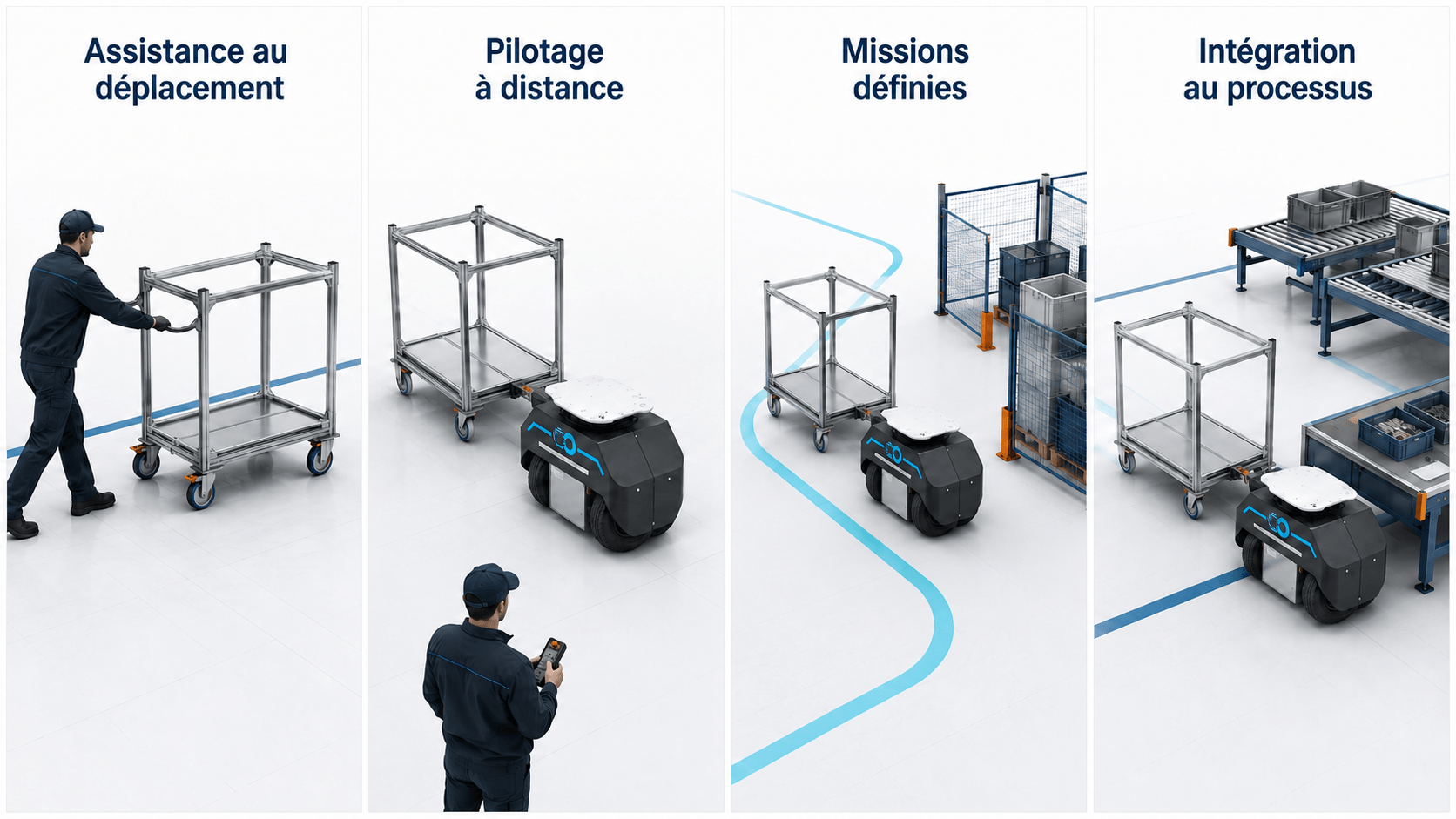
Automation can be approached progressively. The following four levels are an educational framework, not a contractual classification.
Level 1 — Movement assistance
The operator retains direct control of the operation.
The solution makes the structure easier to move, especially when its load, size or behavior makes maneuvering difficult.
This level may suit routes that change frequently or movements that still require human intervention.
Level 2 — Remote control
The operator controls the structure using a radio remote or suitable interface.
This lets them choose a better observation point, anticipate passageways and reduce some constraints of direct manual handling.
Responsibility for the maneuver remains clearly with a person.
Level 3 — Defined missions
The structure performs known movements in an assessed environment.
Starting points, destinations and mission conditions are defined in advance.
This level becomes useful when transfers repeat often enough to be formalized, while retaining suitable supervision and recovery rules.
Level 4 — Process integration
Movement is coordinated with other operations.
The structure can receive authorization, wait for a workstation to become available, perform a mission and report its status to the system specified for the project.
This integration may involve:
- workstations;
- production states;
- traffic authorizations;
- supervision;
- mission management;
- charging.
The highest level is not automatically the best.
The appropriate level solves the problem, is understandable to teams, can be maintained and has an acceptable fallback mode.
Design the interface and fallback mode
When the existing structure is retained, the mechanical interface becomes a central part of the project.
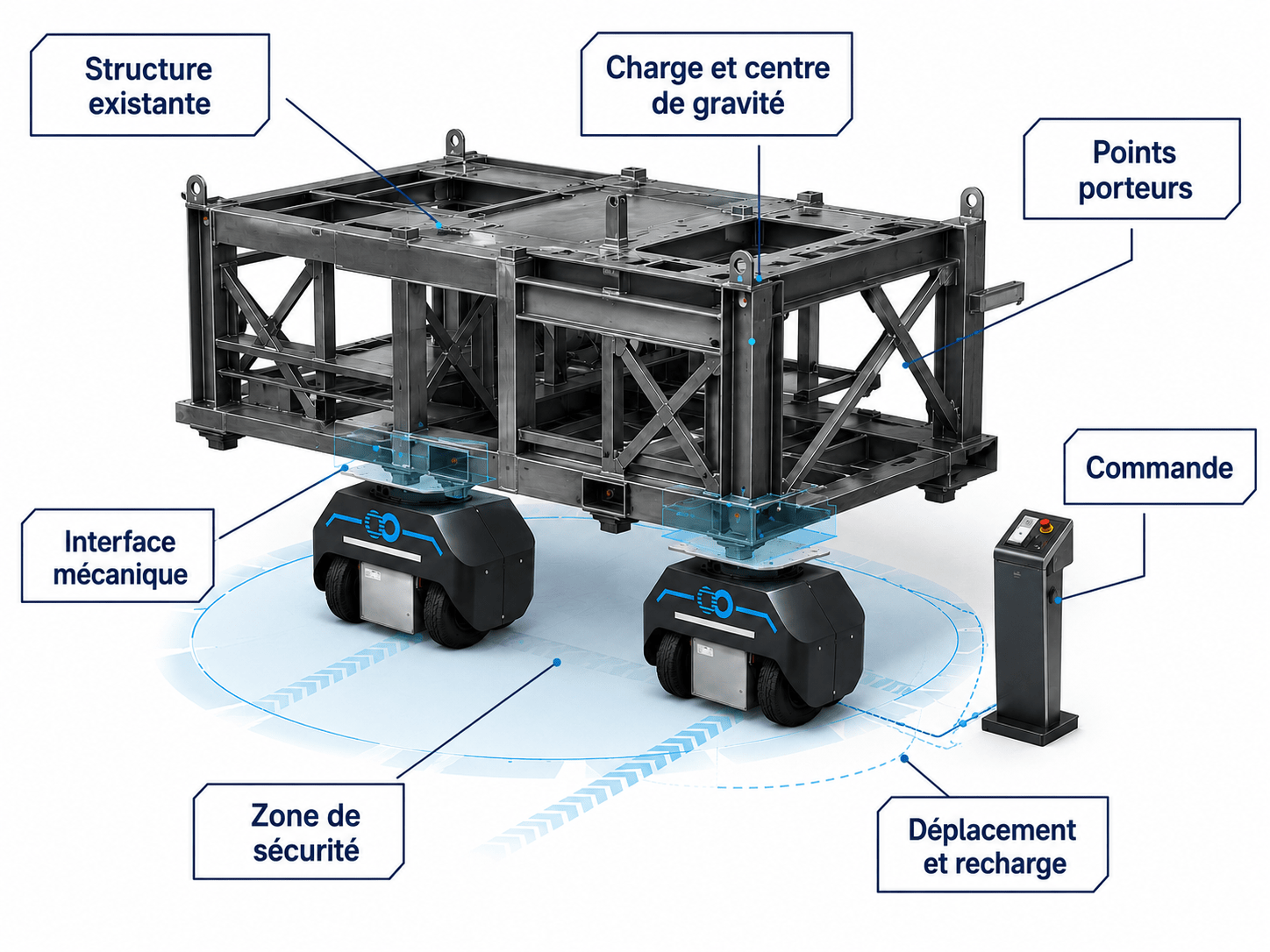
It must transmit forces while preserving:
- stability;
- rigidity;
- load-bearing points;
- accessibility;
- the behavior of the structure;
- maintenance operations.
The interface must not be treated as a simple connector. It is part of the mobility system.
Its design may cover:
- the geometry of support points;
- force distribution;
- fastening devices;
- locking requirements;
- compatibility with workstations;
- protective features;
- assembly and disassembly operations.
The project must also plan for what happens if a mission does not go as expected.
The fallback mode must answer practical questions:
- how do you stop and secure the structure?
- how do you regain manual control?
- how do you clear a passage?
- how do you access the load?
- how do you diagnose a fault?
- how do you continue or stop the operation without creating another blockage?
An automated solution becomes truly usable when it is designed for off-nominal situations too.
Test before deployment
Before full deployment, a proof of concept lets you test assumptions against the real environment.
The goal is not merely to show that the structure can move.
You must verify:
- its behavior with a representative load;
- stability during maneuvers;
- the most constrained passages;
- positioning accuracy on arrival;
- interactions with teams;
- how the controls work;
- stopping and restarting;
- the fallback mode;
- accessibility for maintenance.
The test should reproduce real conditions as closely as possible.
A simplified route may validate a mechanical principle, but it does not always validate day-to-day operation.
Illustrative hypothetical example
Consider a metal structure used to transport tooling between two workstations.
The structure remains robust and its interface with the tooling is still suitable. Moving it, however, requires several operators and realignment on arrival.
The study could aim to retain:
- the structure;
- the tooling;
- the holding points;
- the interfaces with the workstations.
At the same time, it must analyze:
- load-bearing points;
- total mass;
- the center of gravity;
- the route;
- accuracy;
- the control level;
- safety and fallback operation.
This example is hypothetical. It does not describe a customer project or a validated technical configuration.
Roll out gradually within the flow
Once feasibility is demonstrated, deployment can begin within a controlled scope.
It may be preferable to start with:
- one structure;
- one route;
- two workstations;
- one type of mission;
- a designated team.
This approach helps establish:
- loading methods;
- pre-departure checks;
- responsibilities;
- mission management;
- maintenance;
- incident handling;
- user training.
Results must be observed in real use.
It is not enough to check that the structure moves. You must also understand whether the organization becomes smoother, more consistent and easier to operate.
Once the initial scope is stable, the architecture can evolve to include other structures, other missions or a higher level of automation.
Points of caution and limitations
Automating an existing structure remains an integration project.
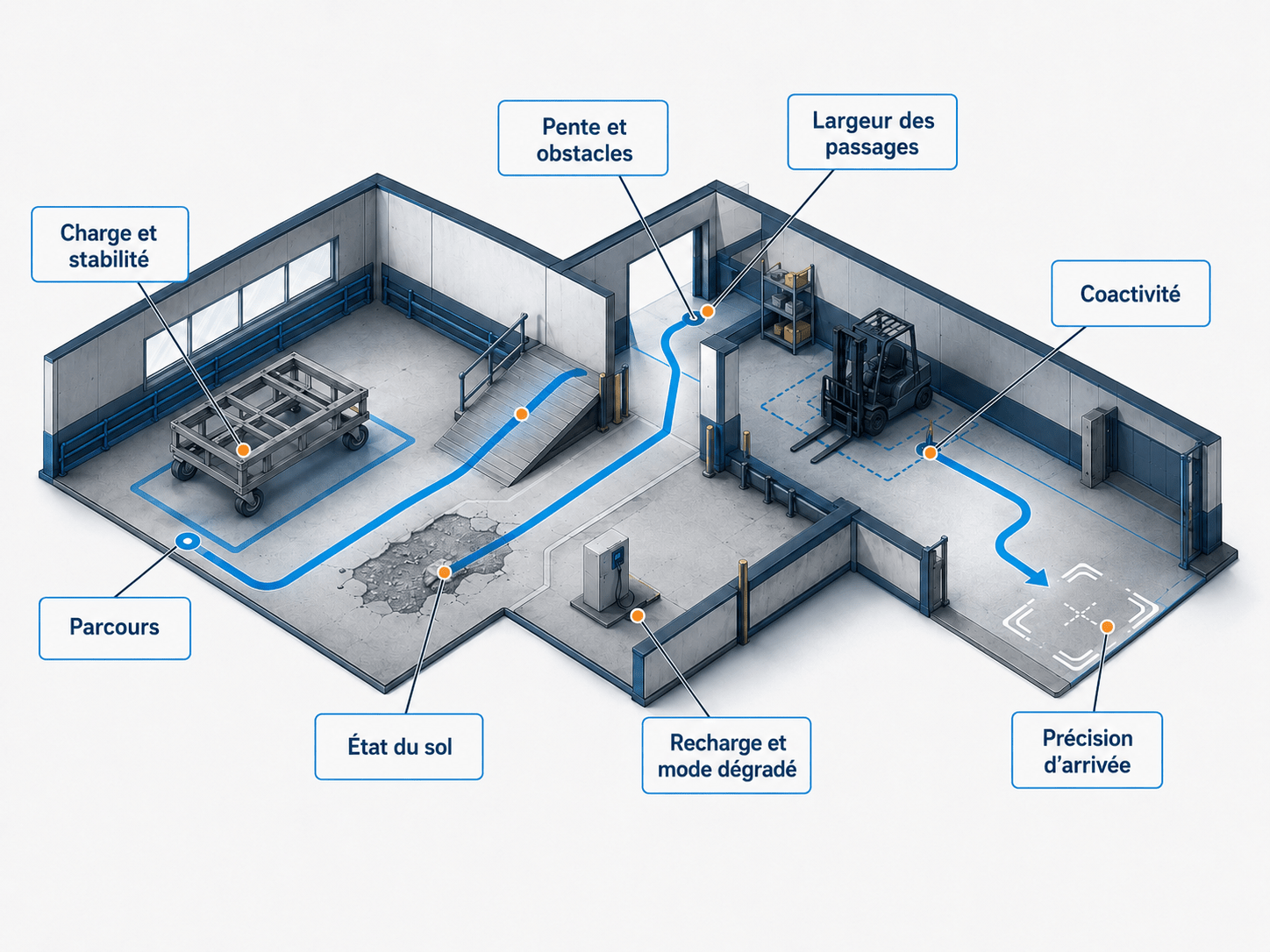
It must take account of shared working areas, site constraints, human operations and the safety measures applicable to the project.
Key points of caution include:
- the load and its stability;
- the floor condition;
- slopes and obstacles;
- the width of passages;
- interactions with operators and vehicles;
- positioning accuracy on arrival;
- charging;
- operation in a fallback situation;
- maintenance access.
Not every structure can be adapted under suitable conditions.
Replacement may remain preferable if:
- the structure is mechanically degraded;
- its rigidity is insufficient;
- its stability is incompatible with movement;
- its center of gravity creates a major constraint;
- there is no usable interface point;
- its geometry no longer fits through passageways;
- the required changes are disproportionate;
- the equipment is nearing the end of its service life;
- future needs differ substantially from its current function.
A serious study must be able to conclude that another solution is more appropriate.
Checklist before starting the study
Before consulting an integrator or comparing technologies, gather the following information:
- Which function of the structure should be retained?
- Which function should be automated?
- What are its dimensions?
- What is its unladen mass?
- What is its total loaded mass?
- How is the load distributed?
- Where is its center of gravity?
- What load-bearing points are available?
- What mechanical interfaces already exist?
- What route must it follow?
- What floor surfaces, slopes and obstacles are present?
- What passage width is available?
- What positioning accuracy is required on arrival?
- How should the mission be triggered?
- How should the structure be stopped or cleared in the event of a fault?
- What interactions occur with operators and other vehicles?
- What future changes should be anticipated?
- Is replacement being considered because of the structure itself, or only because it lacks mobility?
This checklist does not automatically provide a solution.
It helps prepare a study based on observable facts and reduce assumptions at the start of the project.
Automating what you already have starts by separating functions
Automating an industrial structure does not necessarily mean replacing everything around it.
The first step is to distinguish:
- the mechanical function that remains useful;
- the mobility that needs improvement;
- the interfaces that need adapting;
- the level of automation actually required;
- safety and maintenance conditions.
The goal is neither to retain by default nor to replace systematically.
It is to build an architecture aligned with the operation, environment, teams and future changes.
Before rebuilding an entire installation, it may be worth examining the capability the existing structure really lacks.
More industrial insights are available in the FreeMoov Resource Center.
Let’s study how to automate your existing structure.
Tell us about its geometry, load, environment, route and the movement to automate. The FreeMoov team can assess feasibility before defining a suitable architecture.